






Transferring a domain name means moving it from your current registrar to another registrar while keeping the domain itself unchanged. Your website, DNS records, and email services continue working as usual. The transfer only changes who manages your domain.
This guide explains everything you need to know about transferring a domain to Nicenic, including requirements, the transfer process, common errors, and what to expect along the way.
1. What Is a Domain Transfer
A domain transfer is the process of moving a domain name from one registrar to another. The domain does not change, and it does not affect your website or users. You are simply choosing a better place to manage your digital asset.
During a transfer:
-
Your website stays online
-
DNS settings remain unchanged
-
Email services continue working
-
You keep full ownership of the domain
As long as the domain is unlocked and you have the correct authorization code, it can be transferred freely.
There are many reasons why users move their domains to Nicenic.
Better renewal pricing
Many registrars increase renewal fees significantly. Nicenic provides stable and transparent pricing.
Better support and reliability
Domains are valuable assets. You want them managed by a registrar that responds quickly and acts professionally.
Consolidation
Moving all domains into one account simplifies DNS, renewals, and bulk operations.
Better security
Nicenic provides strong account protection including two factor authentication and domain security features.
Tools for professionals
Bulk tools, reseller features, and API support are essential for agencies, developers, and e commerce sellers.
3. Requirements Before Starting a Domain Transfer
Most transfer failures happen because the basic requirements are not met. Make sure you complete the following steps before submitting a transfer request.
Domain must be unlocked
Its status cannot be clientTransferProhibited.
You need the Auth Code
Also called EPP code or Authorization Code. It works like a password for transfers.
Domain must be at least sixty days old
ICANN rules require that newly registered or newly transferred domains must wait sixty days before another transfer.
Domain cannot be in special status
These statuses block transfers:
-
redemptionPeriod
-
pendingDelete
-
pendingTransfer
-
hold status such as clientHold or serverHold
The registrant email must be valid. Many registries send a confirmation message to the domain owner email during the process.
4. How to Transfer a Domain to Nicenic
The entire process is simple and secure.
Step One: Unlock your domain and get the Auth Code from your current registrar
Look for settings such as Unlock Domain, Transfer Code, EPP Code, or Authorization Code.
Step Two: Enter your domain and Auth Code on Nicenic and submit the transfer
Nicenic automatically submits the request to the registry and monitors the transfer.
Step Three: Wait for the registry to approve
Once completed:
-
The domain appears in your Nicenic account
-
DNS and website access remain unchanged
-
You can renew, configure DNS, or enable privacy immediately
5. Common Reasons a Transfer Fails
The domain is locked
Codes must be copied exactly or reissued.
Sixty day ICANN lock
The domain is too new or was just transferred recently.
Domain is in redemption or pending delete
6. Frequently Asked Questions
Q1: Will my website go offline during a transfer?
No. DNS and hosting remain unchanged.
Q2: Can I change DNS during a transfer?
Yes, but it is better to avoid large adjustments during the process.
Q3: Does a transfer include one year of renewal?
Most gTLDs add one year automatically. Some ccTLDs follow different rules, and Nicenic will display the correct pricing.
Q4: How long does a transfer take?
Usually five to seven days. Some transfers can finish within hours if the previous registrar supports manual approval.
Q5: Will my Whois information change?
Normally it stays the same unless you enable Nicenic Whois Privacy.
Why Transfer Your Domain to Nicenic
Nicenic is an ICANN accredited registrar that provides:
-
Transparent pricing without hidden renewal fees
-
A global DNS network for stability and speed
-
Modern security features including two factor authentication
-
A clean and intuitive control panel
-
Bulk domain tools and API support
-
Professional multilingual customer service
Your domain is managed under international standards with reliable infrastructure and strict compliance.
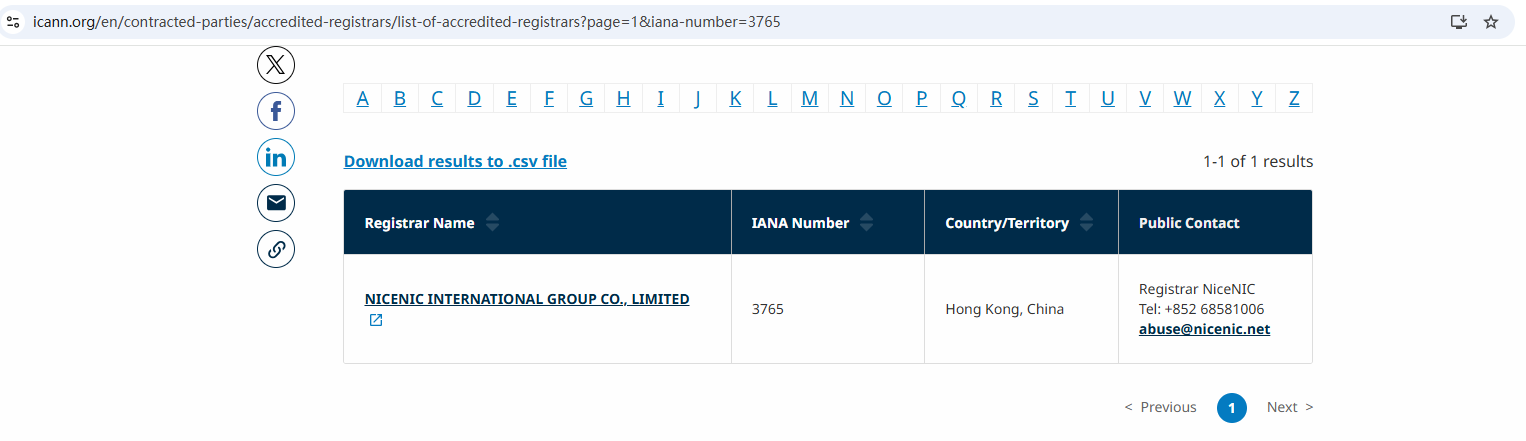
Verified ICANN Accreditation
NiceNIC is an ICANN, gTLDs, ccTLD, new gTLDs Accredited Domain Registrar, Professional Business Email, SSL Certificate, Hosting & Server Provider, founded in 2006.
Conclusion
A domain transfer is more than an administrative action. It is a decision about who you trust to safeguard your digital identity.
Whether you want better pricing, stronger security, or a more reliable control panel, transfer your domain to Nicenic gives you a stable environment to grow your online presence.
Nicenic stands as that trusted partner for brands, developers, entrepreneurs, and businesses worldwide.
Next News: How NiceNIC Serves Its Customers A Service Philosophy Built on Precision Support and Real Problem Solving